CLI Reference
Complete command-line interface reference for the GitHub OAuth Helper.
Overview
The gh-oauth-helper CLI provides a convenient way to handle GitHub OAuth authentication flows from the command line. It supports the complete OAuth flow including authorization URL generation, token exchange, token validation, and token revocation.
🎨 Rich User Interface
The CLI features a modern, colorized interface with:
🚀 ASCII Art Header: Beautiful project branding with rainbow gradient colors
📊 Rich Tables: Clean, formatted data presentation
🎯 Status Icons: Visual indicators (✓, ℹ, ⚠, ✗) for different message types
🌈 Rainbow Gradients: Each line of ASCII art displays in different vibrant colors
🎭 Centered Layout: ASCII art is perfectly centered within terminal panels
📱 Responsive Design: Adapts to terminal width and capabilities
Header Display
By default, the CLI shows a beautiful ASCII art header with author information:
╭─────────────────────────────── GitHub OAuth Helper ──────────────────────────────────╮
│  ██████╗ ██╗  ██╗      ██████╗  █████╗ ██╗   ██╗████████╗██╗  ██╗                    │
│ ██╔════╝ ██║  ██║     ██╔═══██╗██╔══██╗██║   ██║╚══██╔══╝██║  ██║                    │
│ ██║  ███╗███████║     ██║   ██║███████║██║   ██║   ██║   ███████║                    │
│ ██║   ██║██╔══██║     ██║   ██║██╔══██║██║   ██║   ██║   ██╔══██║                    │
│ ╚██████╔╝██║  ██║     ╚██████╔╝██║  ██║╚██████╔╝   ██║   ██║  ██║                    │
│  ╚═════╝ ╚═╝  ╚═╝      ╚═════╝ ╚═╝  ╚═╝ ╚═════╝    ╚═╝   ╚═╝  ╚═╝                    │
╰────────────────────────────────────────────────────────────────────────────────────────╯
Control Options:
--no-header: Disable ASCII art header display--json: Automatically disables header for clean JSON output
Rich Data Tables
Verbose mode (--verbose) displays information in beautiful tables:
                       OAuth Configuration
┏━━━━━━━━━━━━━━━━━━┳━━━━━━━━━━━━━━━━━━━━━━━━━━━━━━━━━━━━━━━━━━━━━┓
┃ Property         ┃ Value                                       ┃
┡━━━━━━━━━━━━━━━━━━╇━━━━━━━━━━━━━━━━━━━━━━━━━━━━━━━━━━━━━━━━━━━━━┩
│ Scopes Requested │ user, repo                                  │
│ State Parameter  │ DyXY3J8zQkHFK0YOFr5vI5PYo24ktWz8Fc6wC6H... │
│ Redirect Uri     │ http://localhost:8080/callback              │
└──────────────────┴─────────────────────────────────────────────┘
Global Options
These options can be used with any command:
gh-oauth-helper [GLOBAL_OPTIONS] <command> [COMMAND_OPTIONS]
Global Flags
Flag |
Description |
Default |
|---|---|---|
|
GitHub OAuth app client ID |
|
|
GitHub OAuth app client secret |
|
|
OAuth redirect URI |
|
|
Enable secure mode (HTTPS required) |
|
|
Output results in JSON format |
|
|
Enable verbose output |
|
|
Show help message |
- |
|
Show version information |
- |
Commands
auth - Generate Authorization URL
Generate a GitHub OAuth authorization URL that users can visit to authorize your application.
gh-oauth-helper auth [OPTIONS]
Options
Option |
Description |
Default |
|---|---|---|
|
OAuth scopes to request |
|
|
Custom state parameter |
Auto-generated |
|
Automatically open URL in browser |
|
Examples
# Basic authorization URL generation
gh-oauth-helper auth

# Request specific scopes
gh-oauth-helper auth --scopes user public_repo read:org

# Auto-open in browser
gh-oauth-helper auth --open

# Custom state parameter
gh-oauth-helper auth --state "my-custom-state-123"

# Production setup with HTTPS
gh-oauth-helper --secure auth --redirect-uri https://myapp.com/callback

# JSON output for scripting
gh-oauth-helper --json auth --scopes user
Sample Output
Visual Example:
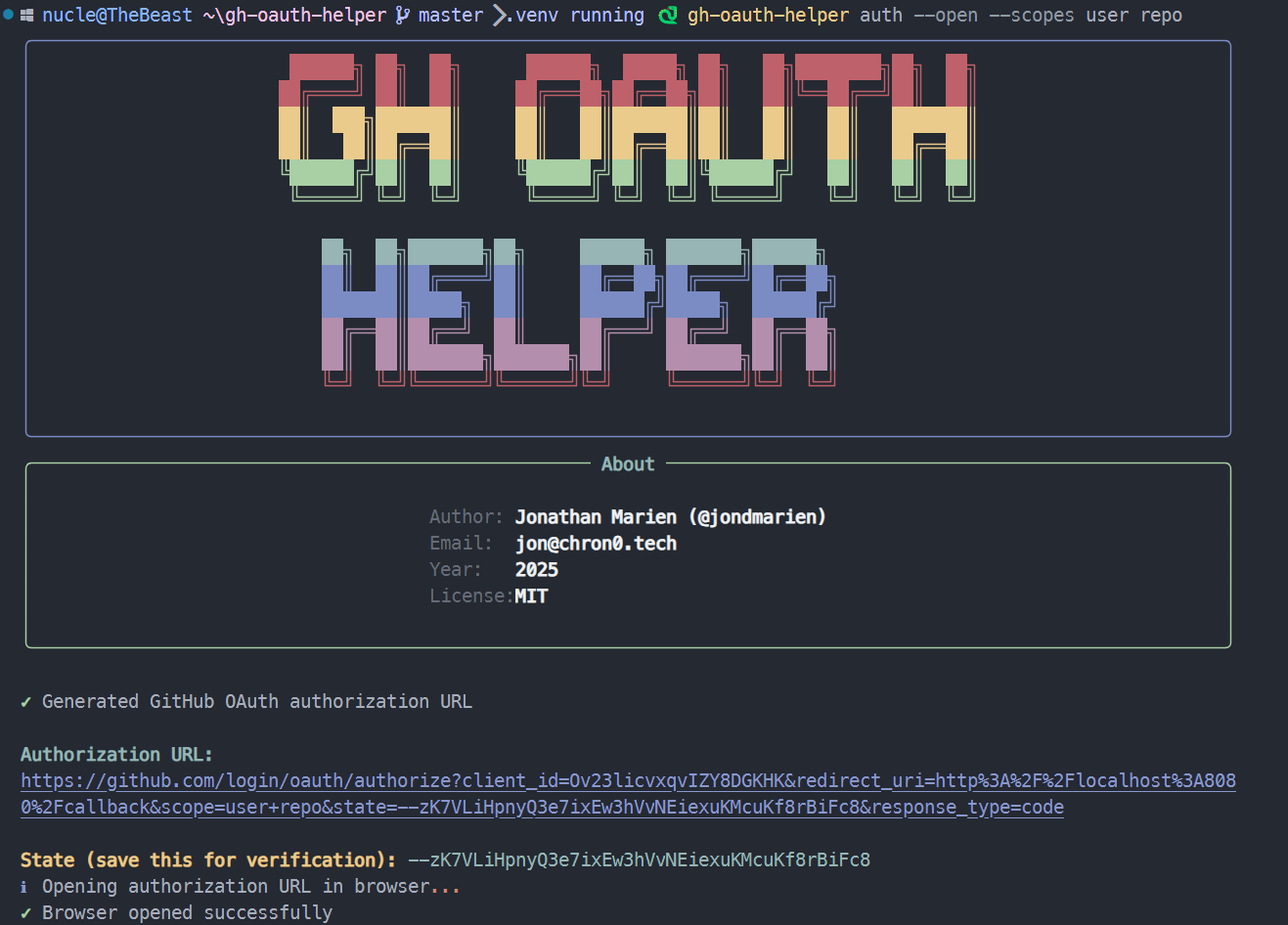
Human-readable format:
✓ Generated GitHub OAuth authorization URL

Authorization URL:
https://github.com/login/oauth/authorize?client_id=...&scope=user%3Aemail+repo&state=abc123...

State (save this for verification): abc123def456...

ℹ Please visit the URL above to authorize the application.
JSON format (--json):
{
  "authorization_url": "https://github.com/login/oauth/authorize?client_id=...",
  "state": "abc123def456...",
  "scopes": ["user:email", "repo"]
}
token - Exchange Code for Token
Exchange an authorization code received from GitHub’s callback for an access token.
gh-oauth-helper token [OPTIONS]
Options
Option |
Description |
Required |
|---|---|---|
|
Authorization code from GitHub |
Yes (or use –url) |
|
State parameter for verification |
No |
|
Full callback URL with code and state |
Yes (or use –code) |
Note: --code and --url are mutually exclusive. The --url option automatically extracts both code and state parameters from the callback URL, making it easier to use. See OAUTH_FLOW_GUIDE.md for detailed examples.
Examples
# Basic token exchange (traditional method)
gh-oauth-helper token --code ghu_1234567890abcdef

# With state verification (recommended)
gh-oauth-helper token --code ghu_1234567890abcdef --state abc123def456

# Easy URL method (recommended for beginners - see OAUTH_FLOW_GUIDE.md)
gh-oauth-helper token --url "http://localhost:8080/callback?code=ghu_1234567890abcdef&state=abc123def456"

# JSON output
gh-oauth-helper --json token --code ghu_1234567890abcdef
Sample Output
Visual Example:
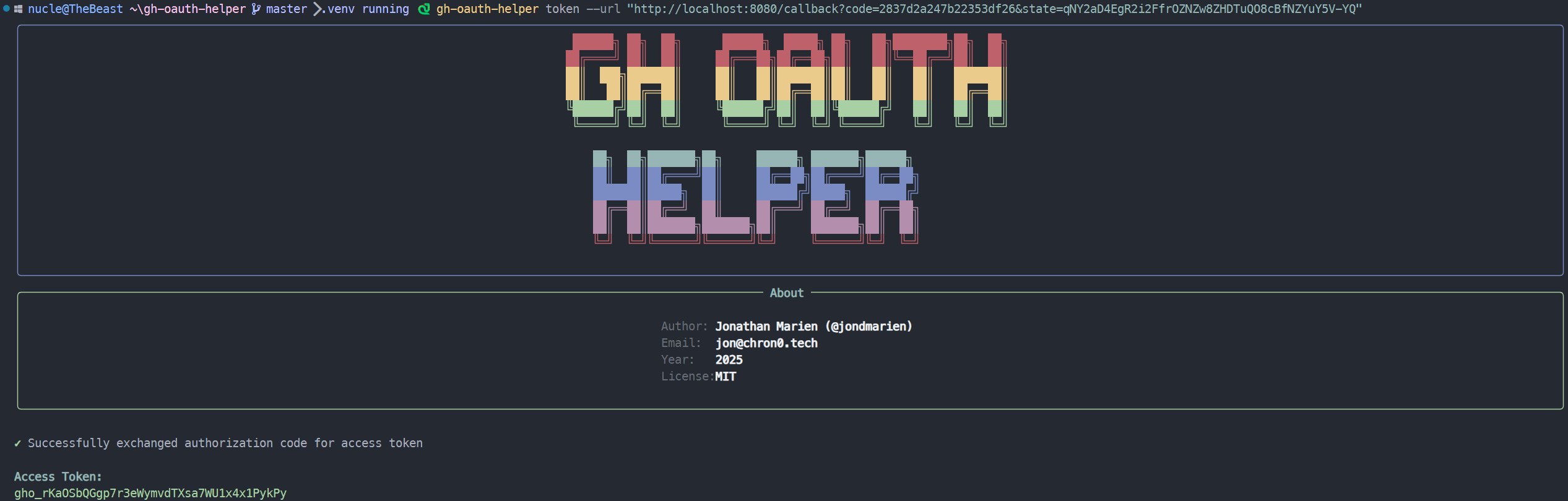
Human-readable format:
✓ Successfully exchanged authorization code for access token

Access Token: gho_1234567890abcdef...
Token Type: bearer
Scope: user:email,repo

ℹ Token is ready for use with GitHub API
JSON format (--json):
{
  "access_token": "gho_1234567890abcdef...",
  "token_type": "bearer",
  "scope": "user:email,repo"
}
test - Test Token Validity
Test an access token by making a request to the GitHub API.
gh-oauth-helper test [OPTIONS]
Options
Option |
Description |
Required |
|---|---|---|
|
Access token to test |
Yes |
Examples
# Test token validity
gh-oauth-helper test --token gho_1234567890abcdef

# Verbose output
gh-oauth-helper --verbose test --token gho_1234567890abcdef

# JSON output
gh-oauth-helper --json test --token gho_1234567890abcdef
Sample Output
Visual Example:
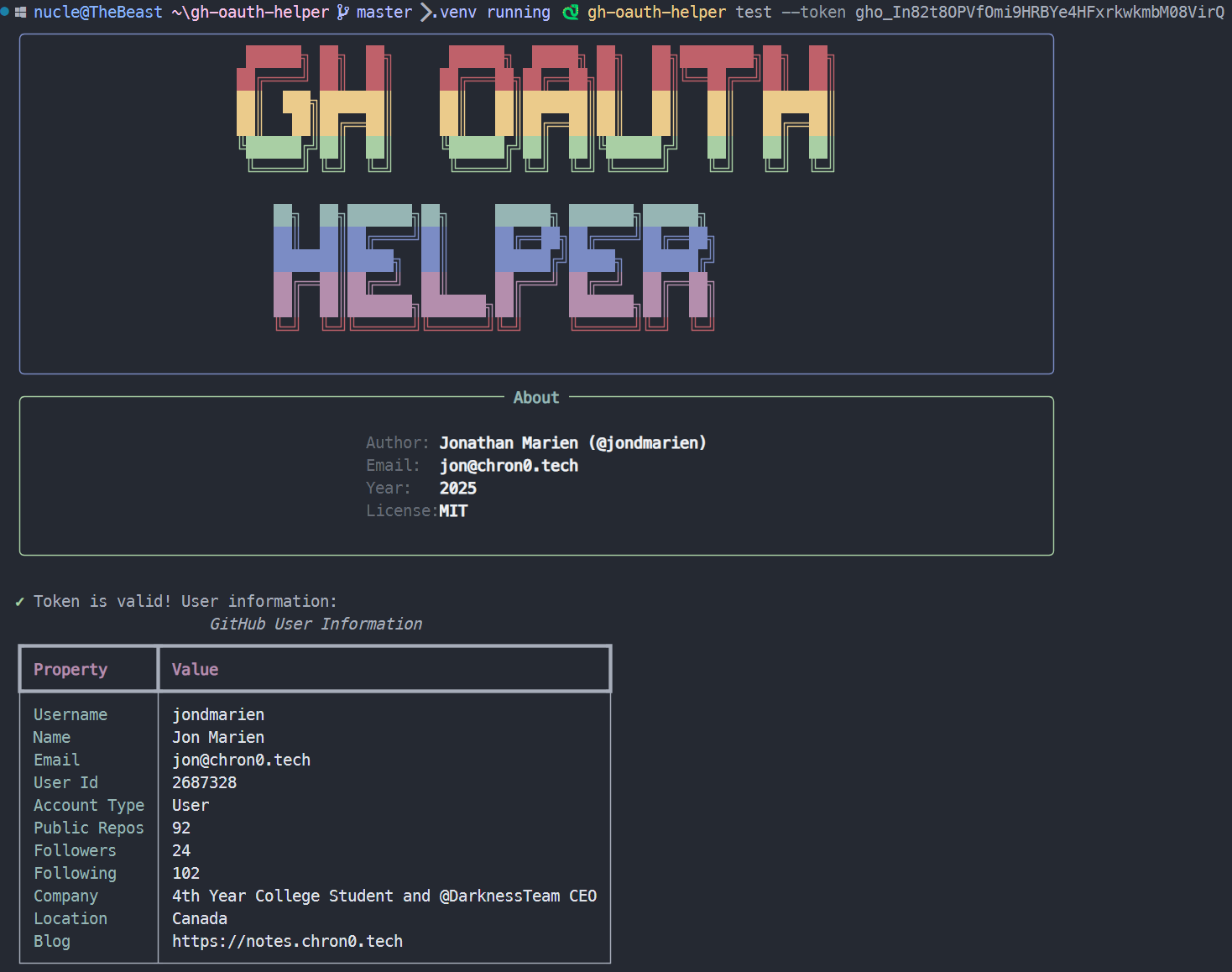
Human-readable format:
✓ Token is valid

User: octocat
Name: The Octocat
Email: [email protected]
Scopes: user:email,repo

ℹ Token has access to 2 scopes
JSON format (--json):
{
  "valid": true,
  "user": {
    "login": "octocat",
    "name": "The Octocat",
    "email": "[email protected]",
    "id": 583231
  },
  "scopes": ["user:email", "repo"]
}
revoke - Revoke Token
Revoke an access token, invalidating it for future use.
gh-oauth-helper revoke [OPTIONS]
Options
Option |
Description |
Required |
|---|---|---|
|
Access token to revoke |
Yes |
Examples
# Revoke token
gh-oauth-helper revoke --token gho_1234567890abcdef

# JSON output
gh-oauth-helper --json revoke --token gho_1234567890abcdef
Sample Output
Human-readable format:
✓ Token revoked successfully

ℹ Token is no longer valid for API access
JSON format (--json):
{
  "revoked": true,
  "message": "Token revoked successfully"
}
Environment Variables
The CLI reads configuration from environment variables:
# Required
export GITHUB_CLIENT_ID="your_oauth_app_client_id"
export GITHUB_CLIENT_SECRET="your_oauth_app_client_secret"

# Optional
export GITHUB_REDIRECT_URI="http://localhost:8080/callback"
Security Modes
Standard Mode (Default)
Allows HTTP for localhost development and shows warnings for non-localhost HTTP URLs:
# HTTP localhost - allowed
gh-oauth-helper auth --redirect-uri http://localhost:8080/callback

# HTTP non-localhost - allowed with warning
gh-oauth-helper auth --redirect-uri http://staging.example.com/callback
⚠️ Warning: Using HTTP redirect URI for non-localhost address. Consider using HTTPS in production.

# HTTPS - always secure
gh-oauth-helper auth --redirect-uri https://myapp.com/callback
Secure Mode
Enforces HTTPS for non-localhost URLs:
# Enable secure mode
gh-oauth-helper --secure auth --redirect-uri https://myapp.com/callback

# This will fail in secure mode
gh-oauth-helper --secure auth --redirect-uri http://staging.example.com/callback
❌ OAuth Error: Secure mode requires HTTPS redirect URI for non-localhost addresses

# Localhost still allowed in secure mode
gh-oauth-helper --secure auth --redirect-uri http://localhost:8080/callback
Complete Workflows
Development Workflow
# 1. Generate authorization URL
gh-oauth-helper auth --open

# 2. User authorizes in browser, copy code from callback

# 3. Exchange code for token (traditional method)
gh-oauth-helper token --code YOUR_AUTH_CODE

# Alternative: Use the easier paste-the-URL method
gh-oauth-helper token --url "FULL_CALLBACK_URL"

# 4. Test token
gh-oauth-helper test --token YOUR_ACCESS_TOKEN

# 5. Use token with GitHub API
curl -H "Authorization: token YOUR_ACCESS_TOKEN" https://api.github.com/user
Production Workflow
# 1. Generate authorization URL with HTTPS and secure mode
gh-oauth-helper --secure auth \
  --redirect-uri https://myapp.com/oauth/callback \
  --scopes user repo read:org

# 2. In your application, handle the callback and extract the code

# 3. Exchange code for token (in your backend)
gh-oauth-helper --secure token \
  --code "$AUTH_CODE" \
  --state "$SAVED_STATE"

# Alternative: Use the full callback URL for easier integration
gh-oauth-helper --secure token --url "$FULL_CALLBACK_URL"

# 4. Verify token before use
gh-oauth-helper test --token "$ACCESS_TOKEN"
Scripting Workflow
#!/bin/bash
set -e

# Generate auth URL and extract values
AUTH_RESPONSE=$(gh-oauth-helper --json auth --scopes user repo)
AUTH_URL=$(echo "$AUTH_RESPONSE" | jq -r '.authorization_url')
STATE=$(echo "$AUTH_RESPONSE" | jq -r '.state')

echo "Visit: $AUTH_URL"
echo "Enter the authorization code (or paste full callback URL):"
read -r CODE_OR_URL

# Exchange code for token (handle both code and URL formats)
if [[ "$CODE_OR_URL" == http* ]]; then
    TOKEN_RESPONSE=$(gh-oauth-helper --json token --url "$CODE_OR_URL")
else
    TOKEN_RESPONSE=$(gh-oauth-helper --json token --code "$CODE_OR_URL" --state "$STATE")
fi
ACCESS_TOKEN=$(echo "$TOKEN_RESPONSE" | jq -r '.access_token')

# Verify token
TEST_RESPONSE=$(gh-oauth-helper --json test --token "$ACCESS_TOKEN")
USERNAME=$(echo "$TEST_RESPONSE" | jq -r '.user.login')

echo "Successfully authenticated as: $USERNAME"
echo "Access token: $ACCESS_TOKEN"
Error Handling
The CLI provides clear error messages for common issues:
Missing Credentials
$ gh-oauth-helper auth
❌ OAuth Error: GitHub client ID is required. Provide it as parameter or set GITHUB_CLIENT_ID environment variable.
Expired Token
$ gh-oauth-helper test --token expired_token
❌ OAuth Error: Token validation failed: 401 Unauthorized
Network Issues
$ gh-oauth-helper auth
❌ OAuth Error: Failed to connect to GitHub: Connection timeout
Verbose Mode
Use --verbose for detailed operation logs:
$ gh-oauth-helper --verbose auth --open
ℹ️ Initializing GitHub OAuth helper...
ℹ️ Running in standard mode (HTTP allowed for localhost)
ℹ️ Client ID: ghp_abc***def (from environment)
ℹ️ Redirect URI: http://localhost:8080/callback
ℹ️ Scopes requested: user:email, repo
ℹ️ Generated state parameter: abc123def456...
ℹ️ Opening authorization URL in browser...
✅ Browser opened successfully
✅ Generated GitHub OAuth authorization URL
JSON Output
Use --json for machine-readable output suitable for scripting:
# All commands support JSON output
gh-oauth-helper --json auth
gh-oauth-helper --json token --code CODE
gh-oauth-helper --json test --token TOKEN
gh-oauth-helper --json revoke --token TOKEN
JSON output is always valid JSON and includes:
Success/error status
Relevant data (URLs, tokens, user info)
Error messages when applicable
Exit Codes
The CLI uses standard exit codes:
Code |
Description |
|---|---|
|
Success |
|
General error |
|
Invalid arguments |
|
Authentication error |
|
Network error |
|
Permission error |
Example usage in scripts:
if gh-oauth-helper test --token "$TOKEN" > /dev/null 2>&1; then
    echo "Token is valid"
else
    echo "Token is invalid or expired"
    exit 1
fi
Configuration Files
Currently, the CLI does not support configuration files. All configuration is done via:
Command-line arguments (highest priority)
Environment variables (fallback)
Defaults (lowest priority)
Shell Completion
To enable shell completion (future feature):
# Bash
eval "$(gh-oauth-helper completion bash)"

# Zsh
eval "$(gh-oauth-helper completion zsh)"

# Fish
gh-oauth-helper completion fish | source
Troubleshooting
Common Issues
Command Not Found
$ gh-oauth-helper: command not found
Solutions:
Ensure the package is installed:
pip install gh-oauth-helperCheck your PATH includes pip’s bin directory
Try running with full path:
python -m gh_oauth_helper.cli
Browser Not Opening
$ gh-oauth-helper auth --open
⚠️ Could not open browser: No web browser found
ℹ️ Please copy and paste the URL manually
Solutions:
Install a web browser
Set the
BROWSERenvironment variableCopy the URL manually and open in browser
Permission Errors
$ gh-oauth-helper auth
❌ OAuth Error: Permission denied
Solutions:
Check environment variable permissions
Ensure credentials are correctly set
Verify OAuth app configuration on GitHub
Debug Mode
For debugging issues, combine --verbose with error output:
gh-oauth-helper --verbose auth 2>&1 | tee debug.log
This will show detailed operation logs and save them to a file for analysis.
Getting Help
# General help
gh-oauth-helper --help

# Command-specific help
gh-oauth-helper auth --help
gh-oauth-helper token --help
gh-oauth-helper test --help
gh-oauth-helper revoke --help

# Version information
gh-oauth-helper --version